
FROM PDF TO EXCEL
Financial extractions
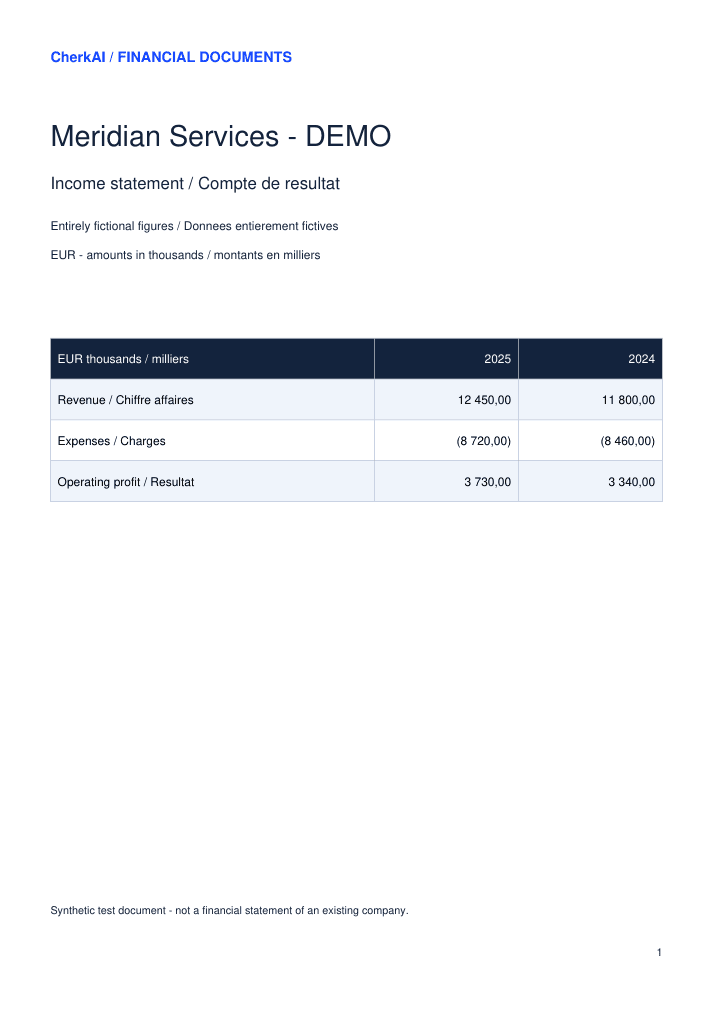
Financial PDF tables, ready for Excel.
- Select the tables you need
- Keep source pages and reported units
- Choose French or English number formats
For finance teams, accountants and analysts
Try without signing upWHAT WE DO

Start with a financial table, organise your fund reporting, or prepare your quarterly review. Choose the workflow you need.
FROM PDF TO EXCEL
Financial PDF tables, ready for Excel.
For finance teams, accountants and analysts
Try without signing upA WORKSPACE FOR YOUR FUNDS
Fund metrics and portfolio company tables.
For LPs, family offices and investment teams
FROM FIGURES TO A REVIEW
A sourced review of your reporting period.
For investment reporting and portfolio reviews
See a quarterly noteA SIMPLE START, WITHOUT SIGNING UP
A balance sheet, income statement or report to bring into Excel? Try table extraction on your text PDFs, then choose what to export.
3 pages from your chosen starting point · PDF up to 5 MB · review the output
Try an example without uploading a file.Processed on the CherkAI server, without external AI. The PDF is not retained after the request.
Scans and unsupported layouts are flagged. Figures remain in their original units.
THE PRODUCT, IN ACTION
From quarterly PDFs to structured fund data.
39 seconds · Product overview
A first look at extraction, source verification and exports.
For recurring fund reporting, use the dedicated workspace alongside the public PDF-to-Excel trial.
Drop in a whole quarter's worth of documents at once. CherkAI processes them together — not one file at a time, not one metric at a time.
NAV, IRR, MOIC, DPI and TVPI at the fund level, plus a line-by-line breakdown of every portfolio company.
Every field carries a confidence score, so you review what's uncertain instead of everything.
Excel or CSV, with a link back to the exact document and page behind every number.
No scraping, no third-party AI on your documents, no accounting module you didn't ask for.
Drag in your quarterly PDFs — letters, capital account statements, spreadsheets — as many as you like, all at once.
Each field shows its confidence. You only check what's uncertain; the rest is already reconciled.
A clean Excel or CSV, every value linked back to its original source page.
FROM FIGURES TO A QUARTERLY REVIEW
Bring your extracted fund metrics together in a clear quarterly note, with period comparisons, source references and the points that still need your attention.
Keep fund, investor account, currency and scope aligned. Ambiguous matches require your choice.
Review reported NAV and ratios. Optionally attach asset tables to compare names and residual values.
Export a factual note with references and review points. Uncertain figures stay visible.
Rule-based generation. No generative AI calls.

Quarterly note
NAV movement
30 Jun → 30 Sep 2026
Reported NAV moves from €11.8m to €12.4m. Net IRR moves from 13.7% to 14.2%; DPI from 0.33× to 0.38×.
NAV movement is not investment performance. Contributions and distributions can also affect it.
NAV · report p. 4 / Net IRR, DPI · report p. 6Illustrative outcomes from the reporting workloads we see most often.
Less time spent reconciling quarterly capital account statements by hand.
From opening the first PDF to a report ready for the family.
Every NAV and MOIC cross-checked before the investment committee sat down.
One consolidated report every quarter, without hiring purely for data entry.
Numbers ready for the family meeting, not the week after it.
Extract a stack of capital account statements in a morning instead of a week.
Choose your use case. We tailor seats and onboarding to your needs.
Your personal workspace to analyse and track your funds.
Named seats for your team and a plan tailored to your organisation.
The public trial processes the PDF during the request without retaining it afterwards. Workspace data follows its retention policy. No document is sent to an external AI service.
The public trial reads tables in text PDFs, up to three pages from your chosen starting point. Scans are flagged, not read. The separate fund tools also support local OCR on scanned fund reports.
The public tool shows raw tables with source pages for review. Fund reporting adds field confidence and consistency checks. No universal accuracy percentage is guaranteed.
The public trial exports the selected tables to Excel. The fund workspace also provides Excel and PDF exports.
The public trial is limited to three pages and stops a read after 15 seconds. Larger fund batches depend on document size, layout and OCR requirements.
“I did this work by hand for two years, in private banking then in a family office. CherkAI is the tool I wish I'd had: it does one thing, does it well, and leaves you the final word on every number.”
Tell us which financial documents you work with. We will check the supported formats and show the workflow that fits your needs.